
No products in the basket.
Milesight, Milesight 4G Routers
Milesight UR32S Lite Series 4G Router with WiFi, 2 x Ethernet (UR32S-L0GEU)
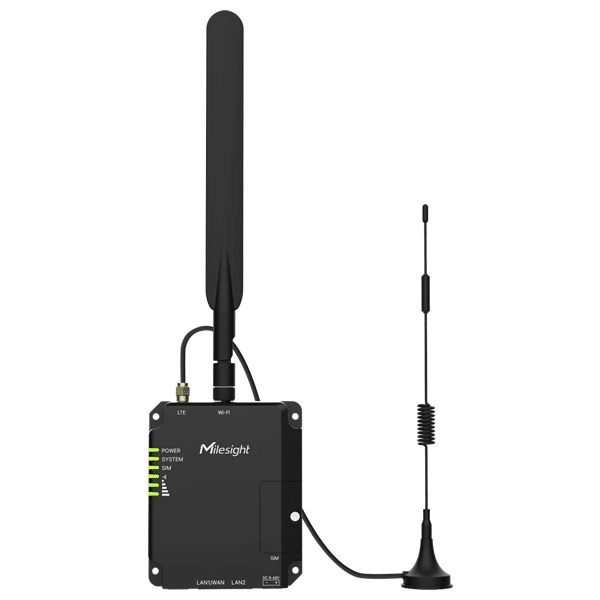
The Milesight UR32S-L0GEU is a compact Lite Series industrial 4G LTE Cat 4 router with 2.4 GHz Wi-Fi, two Ethernet ports and automatic failover between a wired WAN and the cellular network. Wi-Fi is the reason to choose it over the UR32L, and it works in both AP and client mode, which lets an engineer bind the router to the M-Sight Pro app from a phone or bring the site online over an existing wireless network.
Key Features:
4G LTE Cat 4 with 3G and 2G fallback, 150 Mbps down / 50 Mbps up
2.4 GHz 802.11b/g/n Wi-Fi, AP mode or client mode
Automatic failover and failback between Ethernet WAN and cellular
1 x Mini SIM (2FF) slot, 1.8 V / 3 V
2 x RJ45 10/100 Mbps Ethernet, 1 x WAN + 1 x LAN or 2 x LAN, 1.5 kV isolation
1 x SMA cellular antenna connector and 1 x RP-SMA Wi-Fi antenna connector
VPN: IPsec, OpenVPN, GRE, L2TP, PPTP and DMVPN
MilesightVPN and M-Sight Pro app support for remote camera and NVR access
Remote management through the Milesight Development Platform and DeviceHub
ARM Cortex-A7 528 MHz, 128 MB DDR3 RAM, 128 MB flash, hardware watchdog
9 to 48 V DC, typical 1.8 W, surge and reverse polarity protection
-40 to +70 degrees C, IP30 metal housing, DIN rail, wall or desktop mount
£95.00 Excl VAT
Milesight UR32S-L0GEU Lite Series 4G Router with Wi-Fi
The Milesight UR32S-L0GEU is a compact industrial 4G LTE Cat 4 router with 2.4 GHz Wi-Fi, two 10/100 Mbps Ethernet ports and a single Mini SIM slot. It sits in the Lite Series alongside the UR32L, and Wi-Fi is the only thing that separates them. The radio runs in AP mode or client mode. AP mode is how an installer binds the router to the M-Sight Pro app from a phone and reaches the cameras and NVRs behind it. Client mode turns an existing wireless network into the router’s WAN. There is no serial port, no digital I/O and no Python SDK. Those belong to the UR32 Pro Series.
Key features
- 4G LTE Cat 4: 150 Mbps download and 50 Mbps upload, with 3G and 2G fallback across global carrier networks.
- 2.4 GHz Wi-Fi: 802.11b/g/n in AP or client mode, with WPA and WPA2 authentication and WEP, TKIP or AES encryption.
- Automatic WAN failover: the router monitors the Ethernet WAN and switches to cellular on link loss, then falls back without manual action.
- Single SIM: one Mini SIM (2FF) slot at 1.8 V / 3 V.
- Two Ethernet ports: 2 x RJ45 10/100 Mbps with 1.5 kV isolation, configurable as 1 x WAN + 1 x LAN or 2 x LAN.
- Separate antenna connectors: 1 x SMA female for cellular and 1 x RP-SMA female for Wi-Fi. They are not interchangeable.
- VPN: IPsec and OpenVPN with multiple clients and a server, plus GRE, L2TP, PPTP and DMVPN.
- CCTV remote access: MilesightVPN and the M-Sight Pro app give installers batch remote access to connected Milesight cameras and NVRs.
- Fleet management: the Milesight Development Platform and DeviceHub handle mass configuration, firmware updates and status monitoring.
- Industrial platform: ARM Cortex-A7 at 528 MHz, 128 MB DDR3 RAM, 128 MB flash and a hardware watchdog that recovers the unit without a site visit.
- Flexible power: 9 to 48 V DC on a 2-pin 5.08 mm terminal block, typical draw 1.8 W, with surge and reverse polarity protection.
- Industrial build: metal IP30 housing, -40 to +70 degrees C, DIN rail, wall or desktop mounting.
What is the UR32S-L0GEU used for?
Remote CCTV and NVR sites
This is the job Milesight built the UR32S around. The WAN port connects to the same LAN as the cameras and the NVR. An installer joins the router’s Wi-Fi AP from a phone, opens M-Sight Pro, and every device behind the router appears in the app. Remote access permissions are then granted to technicians in batches rather than one camera at a time. MilesightVPN carries the traffic back without exposing the recorder to the internet.
Construction sites and temporary compounds
Welfare units, site cabins and compound offices need connectivity on day one and none of it is permanent. The UR32S provides the cellular uplink and a Wi-Fi network for tablets, laptops and site tablets in one DIN-rail box. When the compound moves, the router moves with it and reconnects to the management platform on power-up. At 1.8 W it runs happily from a battery or a small solar controller.
Retail, hospitality and branch backup
Where a fixed line is the primary connection, the UR32S watches it and cuts over to cellular when it drops. Card terminals and tills stay online through the outage. The Wi-Fi radio covers a small back-office area or a staff device without adding a separate access point. For a customer-facing guest network, a dedicated AP is still the better answer, because this is a single-band 2.4 GHz radio.
Machine and panel commissioning access
Wi-Fi AP mode gives an engineer a way into a machine’s HMI or PLC without opening the enclosure or carrying a patch lead. Connect from a laptop, reach the LAN side, do the work, leave. On skid-mounted plant delivered to a customer site, the same radio lets the OEM’s support team reach the machine remotely over the cellular link and a VPN tunnel.
Wi-Fi as the primary WAN
Client mode is the less obvious use. The router joins an existing wireless network as its uplink, then serves the LAN behind it and keeps cellular in reserve. That covers tenanted units, exhibition stands and shared buildings where you can get a Wi-Fi password but not a network drop. Cellular takes over if the host network fails or the password changes.
Pro tip
The UR32S has one cellular antenna connector, not two. The Lite Series does not run a MAIN and AUX MIMO pair the way the UR32 Pro does, so there is no diversity receive to lean on when the signal is marginal. Antenna choice therefore matters more here, not less. Get the single cellular antenna out of the metal cabinet and onto a bracket, and use a low-loss cable run rather than a long thin one. Note also that the cellular connector is SMA and the Wi-Fi connector is RP-SMA. They look similar and will not mate. Fit the right one to the right port.
Building a resilient cellular connection
Be clear about what this router protects against. The UR32S carries one SIM, so it cannot fail over from one mobile network to another. Its resilience is between a wired WAN and cellular, and that has to be configured under Link Failover before it does anything. If a single carrier going down is the risk you are managing, you need two SIMs on two networks, and that means the UR32 Pro Series. Whichever you choose, pair it with a fixed IP SIM card so the site stays reachable, put the router behind a small UPS, and watch the estate through the Milesight Development Platform so a failover shows up before a phone call does.
Where the UR32S sits in the Milesight range
Four models share the same 108 x 90 x 26 mm metal case, the same processor and the same 9 to 48 V DC input. What changes is what is fitted inside.
- UR32L-L0GEU: cellular and two Ethernet ports. No Wi-Fi, no PoE.
- UR32L-L0GEU-P: adds 802.3af/at PoE PSE on both LAN ports. Still no Wi-Fi.
- UR32S-L0GEU (this product): adds 2.4 GHz Wi-Fi in AP and client mode. No PoE.
- UR32S-L0GEU-P: adds Wi-Fi and 802.3af/at PoE PSE on both LAN ports.
Above all four sits the UR32 Pro Series. The step up is not a faster modem, because the cellular performance is the same LTE Cat 4. What you gain is a second SIM slot for carrier failover, a second cellular antenna port for MIMO, an RS232/RS485 serial port with a Modbus gateway, galvanically isolated digital I/O, a MicroSD slot and the Python SDK for edge logic. If the site has serial instruments, needs two networks, or needs code running on the router, buy the Pro. If the site is Ethernet devices and people with laptops, the UR32S is the correct and cheaper answer.
Frequently asked questions
What is the difference between the UR32S and the UR32L?
Wi-Fi, and nothing else. The UR32L has no wireless radio and no RP-SMA connector. Cellular, Ethernet, VPN, power, enclosure and temperature range are identical. If a site has no need for a wireless network and no need for app-based commissioning, the UR32L is the cheaper unit and removes a radio from the security review.
Does the UR32S have dual SIM failover?
No. It has a single Mini SIM (2FF) slot. Failover on the Lite Series runs between the Ethernet WAN and the cellular connection, not between two carriers. For cellular-to-cellular failover across two mobile networks, the UR32 Pro Series carries two SIM slots. See the full Milesight 4G router range for a comparison.
Can the UR32S-L0GEU power a camera over Ethernet?
No. This variant has no PoE PSE hardware. The UR32S-L0GEU-P adds 802.3af/at PoE PSE on both LAN ports, up to 30 W per port and 60 W in total, and it needs 48 V DC at the terminal block to activate. Call us on 0300 124 6181 for stock on the PoE variant. Otherwise use an existing switch or a standalone injector.
Can I use the Wi-Fi as the internet connection instead of the SIM?
Yes. Client mode joins the router to an existing 2.4 GHz network and uses it as the WAN. Cellular then sits behind it as backup. This is useful in shared buildings and tenanted units where a wired drop is unavailable. Bear in mind that the client radio is single band, so it will not join a 5 GHz only network.
What SIM card do I need for the UR32S?
A Mini SIM in 2FF format. Standard SIM cards sit behind carrier-grade NAT, which blocks inbound connections from a monitoring platform or a VPN server. Therefore any deployment needing inbound access, including remote CCTV, should use a fixed IP SIM card. For roaming and dynamic IP options, see our IoT SIM cards.
How do I manage a fleet of UR32S routers?
Through the Milesight Development Platform, which handles mass configuration, firmware updates and status monitoring across deployed units. DeviceHub remains supported, and MilesightVPN provides a private overlay network between units and their field devices. SNMP v1/v2c/v3 is available for integration with an existing NMS.
Which VPN protocols does it support?
IPsec and OpenVPN, both with multiple clients and a server, plus GRE, L2TP, PPTP and DMVPN. IPsec is the usual choice for a site-to-site tunnel over cellular. Our guide to VPN on cellular routers compares the protocols and covers configuration on a cellular WAN.
Related products and further reading
Browse the full Milesight 4G router range to compare the Lite and Pro Series side by side. Without Wi-Fi, see the UR32L-L0GEU, or the UR32L-L0GEU-P for PoE output. For dual SIM, serial and digital I/O, step up to the UR32 Pro Series. Remote camera projects should also look at our 4G CCTV routers. Pair any of them with a fixed IP SIM card and an antenna for Milesight routers. UK-based technical support is available on 0300 124 6181.
| Cellular Connectivity | |
|---|---|
| Cellular standard | 4G LTE Cat 4 / WCDMA (3G) / GSM (2G) |
| Max download speed | 150 Mbps |
| Max upload speed | 50 Mbps |
| LTE bands (EU variant) | B1, B3, B5, B7, B8, B20, B38, B40, B41 |
| 3G bands | B1, B5, B8 |
| 2G bands | B3, B8 |
| Tx power | LTE Class 3, 23 dBm +/- 2 dB |
| SIM slots | 1 x Mini SIM (2FF), 1.8 V / 3 V |
| Dual SIM failover | Not supported. Failover runs between Ethernet WAN and cellular |
| Cellular antenna connector | 1 x 50 ohm SMA female. No MAIN / AUX MIMO pair on the Lite Series |
| Wi-Fi | |
|---|---|
| Standard | IEEE 802.11b/g/n, 2.4 GHz |
| Modes | Access Point (AP) or Client |
| Security | WPA and WPA2 authentication. WEP, TKIP and AES encryption |
| Tx power | 802.11b: 16 dBm +/- 1.5 dBm at 11 Mbps. 802.11g: 14 dBm +/- 1.5 dBm at 54 Mbps. 802.11n: 13 dBm +/- 1.5 dBm at 65 Mbps, HT20/40 MCS7 |
| Wi-Fi antenna connector | 1 x 50 ohm RP-SMA female. Not interchangeable with the cellular SMA port |
| 5 GHz band | Not supported |
| GNSS / GPS | Not fitted on the Lite Series |
| Ethernet | |
|---|---|
| Ethernet ports | 2 x RJ45 10/100 Mbps |
| Port configuration | 1 x WAN + 1 x LAN (default), or 2 x LAN |
| Duplex | Full or half duplex, auto-sensing |
| Ethernet isolation | 1.5 kV RMS |
| PoE PSE output | Not fitted on the UR32S-L0GEU. Available on the UR32S-L0GEU-P (2 x 802.3af/at, 30 W per port, 60 W total, 48 V DC input required) |
| Interfaces | |
|---|---|
| Serial port | Not fitted. See the UR32 Pro Series |
| Digital I/O | Not fitted. See the UR32 Pro Series |
| MicroSD slot | Not fitted on the Lite Series |
| Reset button | 1 x Reset |
| Status LEDs | 1 x Power, 1 x System, 1 x SIM, 3 x Signal strength |
| Processor and Memory | |
|---|---|
| CPU | ARM Cortex-A7, 528 MHz (NXP) |
| RAM | 128 MB DDR3 |
| Flash | 128 MB |
| Watchdog | Built-in hardware watchdog and timer |
| Python SDK | Not supported on the Lite Series |
| Software and Management | |
|---|---|
| Network protocols | IPv4, IPv6, PPP, PPPoE, SNMP v1/v2c/v3, TCP, UDP, DHCP, RIP v1/v2, OSPF, DDNS, VRRP, HTTP, HTTPS, DNS, ARP, QoS, SNTP, Telnet, VLAN, SSH, FRP |
| Reliability | VRRP, automatic Ethernet WAN to cellular failover and failback |
| VPN | IPsec (multiple clients and a server), OpenVPN (multiple clients and a server), GRE, L2TP, PPTP, DMVPN |
| Security | Access control, DMZ, port mapping, MAC binding, SPI firewall, DoS and DDoS protection, IP and domain filtering, IP passthrough |
| AAA | RADIUS, TACACS+, LDAP, local authentication, multiple user authority levels |
| VLAN | Port and tag-based |
| Configuration | Web GUI, CLI, SMS, on-demand dial-up, SNMP v1/v2c/v3 |
| Remote management | Milesight Development Platform, DeviceHub, MilesightVPN |
| CCTV remote access | M-Sight Pro app binding over Wi-Fi AP mode. Batch remote access to connected Milesight cameras and NVRs |
| Power | |
|---|---|
| Power connector | 1 x 2-pin 5.08 mm terminal block |
| Input voltage | 9 to 48 V DC |
| Protection | Surge protection and reverse polarity protection |
| Power consumption | Typical 1.8 W, max 2.2 W |
| Supplied PSU | Mains PSU included. No 48 V supply is required, as this variant has no PoE PSE output |
| Physical | |
|---|---|
| Dimensions (W x H x D) | 108 x 90 x 26 mm |
| Housing | Metal |
| Ingress protection | IP30 |
| Mounting | DIN rail, wall mount or desktop |
| Environmental | |
|---|---|
| Operating temperature | -40 to +70 degrees C. Reduced cellular performance above 60 degrees C |
| Storage temperature | -40 to +85 degrees C |
| Relative humidity | 0% to 95% non-condensing at 25 degrees C |
| Certifications | |
|---|---|
| Regulatory | CE, FCC, RCM |
| Environmental | RoHS |
| EMC | EN 55032, EN 55035 |
| EMS | IEC 61000-4-2 Level 3, IEC 61000-4-3 Level 2, IEC 61000-4-4 Level 2, IEC 61000-4-5 Level 2, IEC 61000-4-6 Level 3, IEC 61000-4-8 Level 1, IEC 61000-4-11 Level 3 |
| Radio | EN 301 489-1/17/19/52, EN 301 511, EN 301 908-1/2/13, EN 303 413 |
| Safety | EN 62368-1 |
| In the Box | |
|---|---|
| Included | 1 x UR32S-L0GEU router, 1 x cellular antenna, 1 x Wi-Fi antenna, 1 x power adapter, 1 x DIN rail clip kit, 4 x wall mounting kits |
| Optional accessories | Magnetic cellular antenna, RA02 stubby cellular antenna, RB02 L-shape wall mounting bracket, DIN rail kit |
| Warranty and Support | |
|---|---|
| Warranty | 3-year manufacturer warranty |
| Support | UK-based technical support, 0300 124 6181 |
Based on 0 reviews
Be the first to review “Milesight UR32S Lite Series 4G Router with WiFi, 2 x Ethernet (UR32S-L0GEU)”
Related products
- 4G CCTV, 4G Routers, Teltonika, Teltonika 4G Routers
Teltonika RUT950 4G LTE Router
Teltonika RUT950 4G router with Ethernet, WiFi and Dual SIM card slots for 4G SIM failover.
We offer the best prices for the RUT950 in the UK and hold large stocks for next working day delivery.
THE RUT950 HAS BEEN REPLACED WITH THE NEW RUT901 – CLICK HERE TO VIEW
SKU: TELTONIKA-RUT950-N


There are no reviews yet.