
No products in the basket.
5G Routers, Office 5G Router, Teltonika, Teltonika 5G Routers
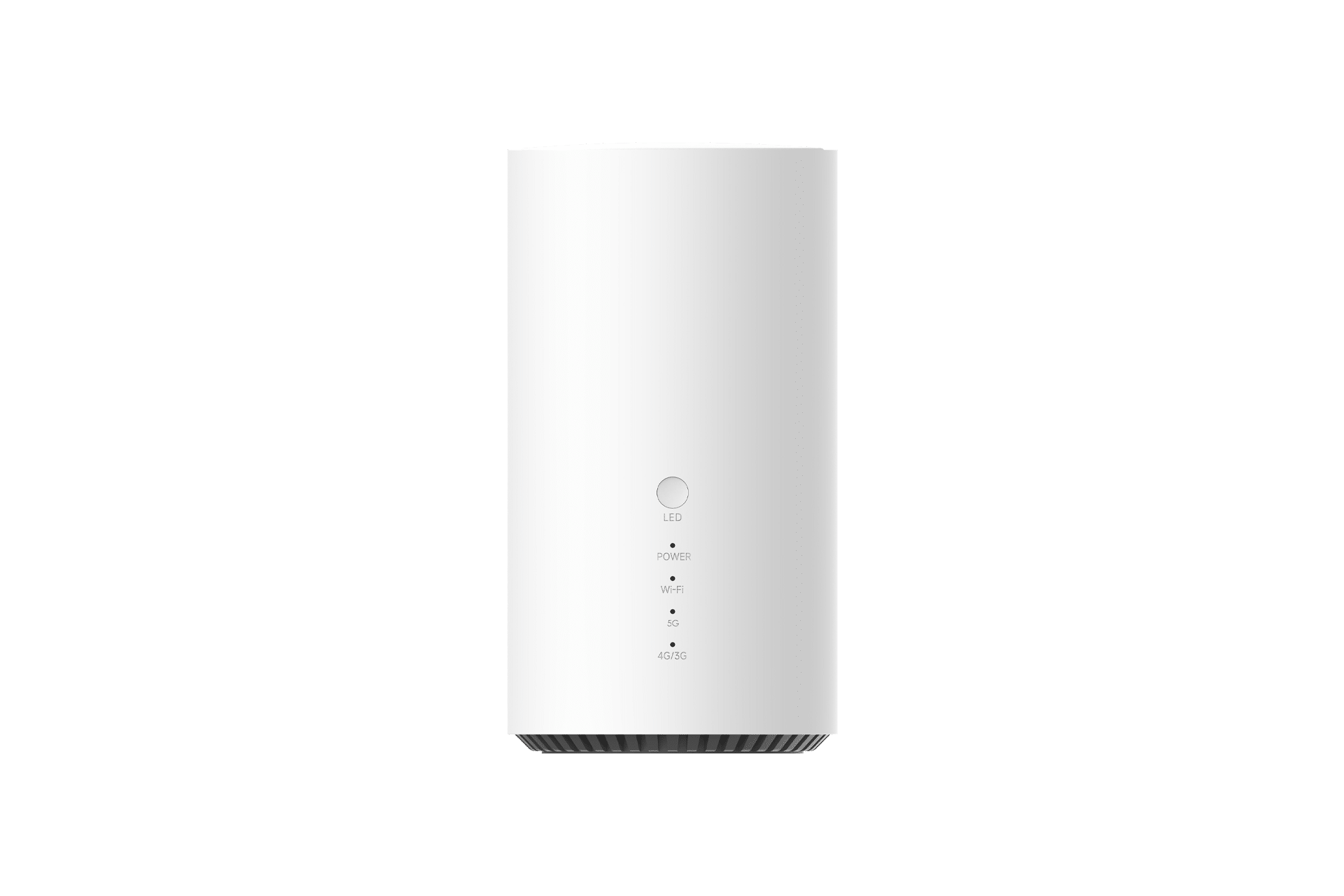
Teltonika ALTOS CAP700
The Teltonika Altos (CAP700) is a 5G Wi-Fi 7 router running full RutOS, built for Fixed Wireless Access at sites where fibre is unavailable or uneconomic. It combines 5G SA and NSA connectivity with Wi-Fi 7, a 2.5 GbE port, and the same VPN, firewall and RMS management stack used across the Teltonika industrial range.
Key Features:
• 5G NR SA and NSA, up to 4.0 Gbps down / 900 Mbps up, 3GPP Release 17
• 4G LTE Cat 19 fallback, up to 1.6 Gbps down / 200 Mbps up
• Wi-Fi 7 (802.11be) dual band, 2×2 MIMO, WPA3, up to 128 simultaneous clients
• 1 x 2.5 GbE WAN/LAN port and 1 x 1 GbE LAN port
• RJ11 telephone port for VoIP handsets
• Qualcomm processor, 1 GB LPDDR4 RAM, 8 GB eMMC flash
• OpenVPN, IPsec, WireGuard, ZeroTier, Tailscale, DMVPN, GRE and L2TP
• Modbus TCP, OPC UA, DNP3, BACnet, DLMS/COSEM and MQTT broker
• Teltonika RMS managed, plus TR-069, SNMP v1/v2/v3 and JSON-RPC API
• Single Nano SIM (4FF), internal antennas, 12 V DC, indoor use, IP30
£245.00 Excl VAT
Teltonika Altos (CAP700) 5G Wi-Fi 7 Router
The Teltonika Altos (CAP700) is a 5G Wi-Fi 7 router for Fixed Wireless Access deployments. It delivers 5G NR in both standalone and non-standalone modes, with 4G LTE Cat 19 fallback where 5G coverage is patchy. What separates it from carrier-supplied hardware is the operating system. The Altos runs full RutOS, the same platform used across Teltonika’s industrial router range, and is managed through Teltonika RMS. You get VLANs, a complete VPN suite, firewall control and fleet management on a device that most vendors would ship as a locked-down broadband box.
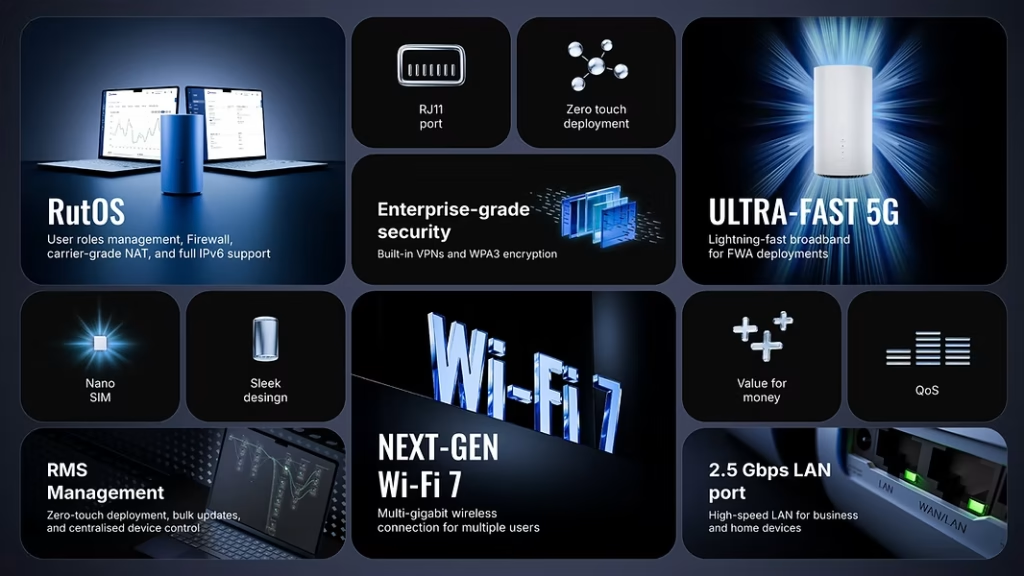
Key features
- 5G NR SA and NSA: Up to 4.0 Gbps download and 900 Mbps upload, 3GPP Release 17.
- 4G LTE Cat 19 fallback: Up to 1.6 Gbps download and 200 Mbps upload when 5G is unavailable.
- Wi-Fi 7 (802.11be): Dual band, 2×2 MIMO, WPA3-SAE and WPA3-EAP, up to 128 simultaneous clients.
- 2.5 Gigabit Ethernet: One 2.5 GbE WAN/LAN port and one 1 GbE LAN port.
- RJ11 telephone port: Connect an analogue handset for VoIP without a separate ATA.
- Full RutOS: OpenVPN, IPsec, WireGuard, ZeroTier, Tailscale, DMVPN, GRE and L2TP, with RADIUS, TACACS+ and 802.1x.
- Industrial protocol support: Modbus TCP, OPC UA, DNP3, BACnet, DLMS/COSEM and an MQTT broker.
- Teltonika RMS: Zero-touch provisioning, remote CLI, configuration templates and firmware rollout across a fleet.
- 1 GB RAM and 8 GB eMMC: More memory and storage than any router in the RUT range.
- Low power draw: Under 8 W idle and under 24 W maximum, from a 12 V DC supply.
What RutOS 7.24 adds to the Altos
Teltonika’s RutOS 7.24 firmware release extends the Altos beyond what the original datasheet describes. Three additions are specific to this platform, and none of them are hardware changes. They arrive with the firmware.
- VXLAN: Extend a layer 2 VLAN across a routed 5G link, so a remote site keeps its original network segment and firewall policy.
- Docker: Run containerised applications on the router itself. Protocol translators, buffering services and monitoring agents run locally rather than on a separate edge PC.
- NetBird: A WireGuard-based mesh VPN. Devices enrol once and reach each other without a tunnel-by-tunnel configuration matrix.
The wider release also brings faster TR-069 session setup, an operator priority list for mobile allowlists, SFTP and FTPS support in Data Sender, and MQTT topic variables. Note that CANopen Client, announced in the same release, requires a physical CAN interface and does not apply to the Altos.
We have written this up in full, including deployment patterns and the practical limits, in our guide to what RutOS 7.24 changes on the Teltonika Altos CAP700.
What is the Altos CAP700 used for?
Fixed Wireless Access where fibre is unavailable
Rural premises, new-build sites awaiting infrastructure, and rented units where a fibre install is not viable. The Altos provides a working broadband service on the day it is unboxed. Because it supports both 5G SA and NSA, it holds a usable connection on networks at different stages of rollout. Read our guide to 5G Fixed Wireless Access for the coverage considerations.
Branch office and retail connectivity
A small branch needs VLAN separation between staff systems, guest Wi-Fi and payment terminals. RutOS handles this natively, and the 2.5 GbE port feeds a downstream switch without becoming the bottleneck. With VXLAN from RutOS 7.24, those VLANs can be extended back to head office across the 5G link rather than terminated locally.
Primary line failover for a fixed circuit
Where a leased line or FTTP circuit carries the business, the Altos serves as the backup path. The 2.5 GbE port accepts the wired WAN, and RutOS fails over to 5G when the wired link drops. Failover is configured in RutOS. It is not automatic out of the box.
Managed service provider deployments
An MSP rolling out fifty sites needs provisioning and diagnostics without a truck roll. RMS handles zero-touch provisioning, firmware rollout and remote CLI access. TR-069 support covers ACS platforms including GenieACS and FreeACS where an existing provisioning system is in place. See our Teltonika RMS explainer.
Temporary offices and project sites
Site cabins, pop-up retail, exhibition stands and disaster recovery suites. Connectivity is needed for weeks or months, not years, and no circuit will be installed in that window. The Altos gives a professional-grade network with proper VPN access back to head office. However, it is IP30 and rated 0 °C to 45 °C, so it must sit inside a heated, dry space.
Edge data handling with Docker
With Docker available from RutOS 7.24, the Altos hosts small containerised workloads. An MQTT bridge, a store-and-forward buffer that queues telemetry during a 5G outage, or a local DNS resolver. The 8 GB eMMC and 1 GB of RAM make this practical. Build images for ARM, and keep them small.
Pro tip
The Altos has internal antennas only. There are no SMA ports, so you cannot fit a directional antenna to fix a weak signal. Placement is the entire tuning process. Move the unit to a first-floor window facing the nearest mast before you conclude the site has poor coverage, and check the RutOS mobile status page for RSRP and SINR rather than the LED bars. If RSRP stays below -105 dBm after repositioning, the site needs an external-antenna router such as the RUTX50 instead. Band locking in RutOS also helps: forcing n78 over n28 can more than double throughput where both are present.
Building a resilient connection
The Altos has one Nano SIM slot and no eSIM, so mobile network diversity is not available within a single unit. Resilience is therefore built from the wired WAN plus the 5G link, with RutOS handling the failover between them. Add a small UPS to carry the router through short mains interruptions, because a 12 V router that reboots takes several minutes to reattach to the network. Monitor uptime through RMS so that a failover event raises an alert rather than passing unnoticed. Where two independent mobile networks are a requirement, specify a dual-SIM model from our Teltonika 5G router range.
Frequently asked questions
Does the Teltonika Altos support Docker?
Docker is not listed on the CAP700 datasheet. It was announced for the Altos platform in Teltonika’s RutOS 7.24 firmware release and is installed from the RutOS Package Manager rather than shipped in the base image. Confirm the feature is present in your device’s WebUI after updating. Our RutOS 7.24 explainer covers what the update adds and what it does not.
Does the Altos CAP700 support dual SIM failover?
No. The Altos has a single Nano SIM (4FF) slot and no eSIM. Failover works between WAN types, so the 2.5 GbE wired port can back up the 5G connection or the reverse. For failover between two mobile networks in one device, the Teltonika RUTX50 carries dual SIM and eSIM.
Can I connect an external antenna to the Altos?
No. All mobile and Wi-Fi antennas are internal and there are no SMA connectors on the enclosure. If your site needs a directional or roof-mounted antenna, choose a router with external antenna ports. Our 5G antenna range pairs with the RUTX50 and RUTM series.
Is the Altos an industrial router?
It runs the same operating system as the industrial range, but the hardware is not built for the same conditions. The Altos is rated 0 °C to 45 °C with an IP30 plastic enclosure and a 12 V barrel jack. There is no DIN rail mount and no digital I/O. Offices, retail units and homes suit it. Roadside cabinets, plant rooms and unheated enclosures do not.
Do I need a fixed IP SIM with the Altos?
Not for general internet use. You need one if a central system must initiate connections inbound to the router or to devices behind it, because standard SIMs sit behind carrier-grade NAT. RMS and outbound VPN work without one. See our fixed IP SIM explainer for the distinction.
Which VPN protocols does the Altos support?
OpenVPN, IPsec, WireGuard, ZeroTier, Tailscale, GRE, L2TP, DMVPN, SSTP and Stunnel, all configured in RutOS. NetBird is added by the RutOS 7.24 firmware release. Our VPN on cellular routers explainer compares them and explains when to use each.
Related products and further reading
For the full detail on the firmware update, read our Altos CAP700 and RutOS 7.24 guide. If you need external antennas, dual SIM or an industrial temperature range, compare the Altos against our Teltonika 5G routers. Connectivity is available through our fixed IP SIM cards, and remote management through Teltonika RMS credits. For a plain-English walkthrough of the numbers on this page, see understanding Teltonika router specifications. The Altos is held in UK stock with next-working-day delivery, and our UK-based technical support team is on 0300 124 6181.
| Cellular Connectivity | |
|---|---|
| 5G | 5G NR, standalone (SA) and non-standalone (NSA) |
| 5G speed | Up to 4.0 Gbps download / 900 Mbps upload |
| 4G | LTE Cat 19, up to 1.6 Gbps download / 200 Mbps upload |
| 3G | Up to 42 Mbps download / 5.76 Mbps upload |
| 3GPP release | Release 17 |
| 5G NR bands | [SPEC TO VERIFY - not published on the CAP700 wiki page] |
| 4G LTE bands | [SPEC TO VERIFY - not published on the CAP700 wiki page] |
| SIM slots | 1 x Nano SIM (4FF) |
| eSIM | Not supported |
| Mobile antennas | Internal. No external antenna connectors. |
| Wi-Fi | |
| Standard | Wi-Fi 7, IEEE 802.11a/b/g/n/ac/ax/be |
| Frequency | Dual band, 2.4 GHz and 5 GHz |
| MIMO | 2x2 MIMO |
| Mode | Access Point |
| Security | WPA3-SAE, WPA3-EAP, WPA2-PSK, WPA2-EAP, OWE |
| Maximum clients | 128 simultaneous connections |
| Wi-Fi antennas | 2 x 2.4 GHz internal, 2 x 5 GHz internal |
| Ethernet | |
| WAN / LAN port | 1 x RJ45, 2.5 Gbps, configurable as WAN or LAN |
| LAN port | 1 x RJ45, 1 Gbps |
| Processor and Memory | |
| CPU | Qualcomm [SPEC TO VERIFY - part number not published] |
| RAM | 1 GB LPDDR4 |
| Flash | 8 GB eMMC |
| Software and Operating System | |
| Operating system | RutOS (OpenWrt-based Linux) |
| VPN | OpenVPN, IPsec, WireGuard, ZeroTier, Tailscale, GRE, L2TP, DMVPN, SSTP, Stunnel |
| Routing | Static, BGP, OSPF v2, RIP v1/v2, policy-based routing |
| Network backup | Mobile, wired and Wi-Fi WAN failover, VRRP, load balancing |
| Firewall | Preconfigured rules via WebUI, unlimited via CLI, DMZ, NAT, NAT-T |
| Attack prevention | DDoS prevention (SYN flood, SSH, HTTP/HTTPS), port scan prevention |
| Authentication | Pre-shared key, X.509 certificates, RADIUS, TACACS+, 802.1x |
| Industrial protocols | Modbus TCP, OPC UA, DNP3, BACnet, DLMS/COSEM, MQTT broker and publisher |
| Management | WebUI (HTTP/HTTPS), CLI, SSH v1/v2, SNMP v1/v2/v3, TR-069, JSON-RPC, FOTA |
| Remote management | Teltonika RMS. RMS credits required |
| IoT platforms | ThingWorx, Cumulocity / Cloud of Things |
| API | Teltonika Networks Web API (beta) |
| Interfaces | |
| Telephony | 1 x RJ11 port |
| USB | 1 x micro USB, virtual network interface only. Not a USB host port. |
| Buttons | Combined power and WLAN button, reset button |
| Status LEDs | Power, mobile signal, Wi-Fi, Ethernet activity |
| Digital I/O | Not supported |
| Serial (RS232 / RS485) | Not supported |
| GNSS | Not supported |
| Power | |
| Connector | 12 V DC barrel jack |
| Input voltage | 12 V DC |
| Power consumption, idle | Under 8 W |
| Power consumption, maximum | Under 24 W |
| PoE | Not supported |
| Physical | |
| Dimensions | 100 mm diameter x 185 mm height |
| Weight | 720 g |
| Housing | Plastic, cylindrical, indoor desk or shelf placement |
| Mounting | Flat surface. No DIN rail or wall mount option. |
| Environmental | |
| Operating temperature | 0 °C to 45 °C |
| Operating humidity | 5% to 95%, non-condensing |
| Ingress protection | IP30. Indoor use only. |
| Certifications and Compliance | |
| Certifications | CE, UKCA, EAC, UCRF, RCM, CB, WEEE |
| In the Box | |
| Package contents | [DATA NEEDED - confirm UK PSU inclusion and order code with Dan] |
| Warranty and Support | |
| Warranty | [SPEC TO VERIFY - CAP700 warranty period not published] |
| Technical support | UK-based technical support, 0300 124 6181 |
| Delivery | UK stock, next-working-day delivery if ordered by 3:00 PM |
Based on 0 reviews
Be the first to review “Teltonika ALTOS CAP700”
Related products
- 5G Routers, Proroute 5G Routers
Proroute H900 Global 5G Router with WiFi6 and GNSSS
The Proroute H900 is a high-performance 5G router designed for industrial, enterprise, and vehicle applications. Featuring a global 5G modem (RM520-GL), WiFi 6, dual SIM failover, and GNSS positioning, it ensures ultra-fast, secure, and reliable connectivity worldwide, even in challenging environments.
Key Features:
✔ Global 5G & LTE Support – Works across multiple networks worldwide.
✔ WiFi 6 (Dual-Band 802.11ax) – Supports up to 128 devices.
✔ GNSS (GPS, GLONASS, Galileo, BeiDou) – Ideal for fleet tracking.
✔ Dual SIM & WAN Failover – Ensures continuous connectivity.
✔ Gigabit Ethernet Ports – 2x Gigabit, 3x Fast Ethernet.
✔ Advanced Security & VPN – IPsec, OpenVPN, WireGuard, firewall.
✔ Rugged Industrial Design – -35°C to 75°C, shock/vibration resistant.SKU: PROROUTE-H900-5G-GLOBAL-WiFI6-GPS-N - 5G Routers, In-Hand Networks
InHand IR624 5G Industrial Router with Wi‑Fi & Dual-SIM (IR624‑NRF4‑WLAN‑S)
 5G Routers, In-Hand Networks
InHand IR624 5G Industrial Router with Wi‑Fi & Dual-SIM (IR624‑NRF4‑WLAN‑S)
The InHand IR624-NRF4-WLAN-S is a rugged 5G industrial router with Wi-Fi, dual SIM failover, and serial connectivity – ideal for IoT, SCADA, and remote networks.
- 5G NR Sub-6GHz with LTE fallback
- Dual SIM slots with intelligent failover
- Dual-band Wi-Fi (2.4GHz & 5GHz)
- 4× Gigabit Ethernet ports (LAN/WAN)
- RS-232 and RS-485 serial interfaces
- Industrial-grade design: -20°C to +70°C
- Secure VPN, firewall, and link watchdog
- Remote management via DeviceLive cloud platform
SKU: INHAND-IR624-NRF4-WLAN-S - 5G CCTV, 5G Routers, Proroute, Proroute 5G Routers, Proroute Routers
Proroute H685f-W-POE Compact 5G Router (Supports POE Power Input 48V)
5G CCTV, 5G Routers, Proroute, Proroute 5G Routers, Proroute RoutersProroute H685f-W-POE Compact 5G Router (Supports POE Power Input 48V)
The Proroute H685F-W-POE 5G Router provides a reliable, industrial 4G router solution with embedded high speed LTE 5G module for high speed mobile broadband data transfer speeds. This compact router provides 2 x Ethernet Ports and built-in WiFi as standard with firewall and VPN to meet most M2M remote monitoring and management applications.
This version supports 802.3af POE switch input (48V) so can connect directly to a POE Network Switch.
Ref : H685F-W-POE 5G Router (H685f-w-p1)
SKU: PRORT-H685f-W-P1-POE-N - 5G Routers, Teltonika, Teltonika 5G Routers
Teltonika RUTM52 Dual Modem 5G Router
The Teltonika RUTM52 is a high-end dual-modem 5G industrial router designed for UK deployments that need uncompromising uptime. It delivers two simultaneous 5G connections, supports both physical SIM and eSIM, and provides instant failover between SIM/eSIM profiles and both 5G modems. With load balancing, BONDIX support for bonded 5G, Multi-WAN flexibility, and WiFi 5, the RUTM52 is built for demanding IoT, M2M, CCTV, and enterprise applications where resilience is non-negotiable.
Key Features
- Dual 5G Modems — run two independent 5G connections at the same time
- SIM + eSIM Support — use physical SIMs, eSIM profiles, or a mix of both
- Instant Failover between SIM, eSIM, WAN, and both 5G modems
- Load Balancing to intelligently distribute traffic across both modems
- Bonded 5G Ready with BONDIX for higher throughput and stability
- Multi-WAN Options including mobile, Ethernet, and failover/fallback modes
- WiFi 5 Support for local wireless access
- Industrial-Grade Hardware for harsh environments and 24/7 operation
- Ideal for UK IoT/M2M including CCTV, EV charging, transport, kiosks, and remote infrastructure
SKU: TELTONIKA-RUTM52100300-N


There are no reviews yet.