
No products in the basket.
Fixed IP SIM cards
Fixed IP SIM cards for routers, CCTV and IoT
Data SIMs for 4G and 5G routers with a fixed public IP or a fixed private IP with VPN access, on a single UK network or roaming across the UK and Europe. This guide helps you pick the right SIM type, IP address and data plan for your project.
- EE, Vodafone, O2 or Three
- UK and Europe roaming
- Public or private fixed IP
- 1GB to 500GB a month

Choosing a fixed IP SIM in three steps
1
Where will it be used?
UK only, UK and Europe, or further afield. This decides between a single-network SIM and a roaming multi-network SIM.
Coverage options2
How will you reach the device?
If you need to log in to the router, a camera or a PLC from elsewhere, you need a fixed IP: public, or private with VPN.
IP options3
How much data?
Telemetry uses very little. Live video and site broadband use a lot. Pick an allowance with some headroom and set usage alerts.
Data plansUK only, UK and Europe, or worldwide?
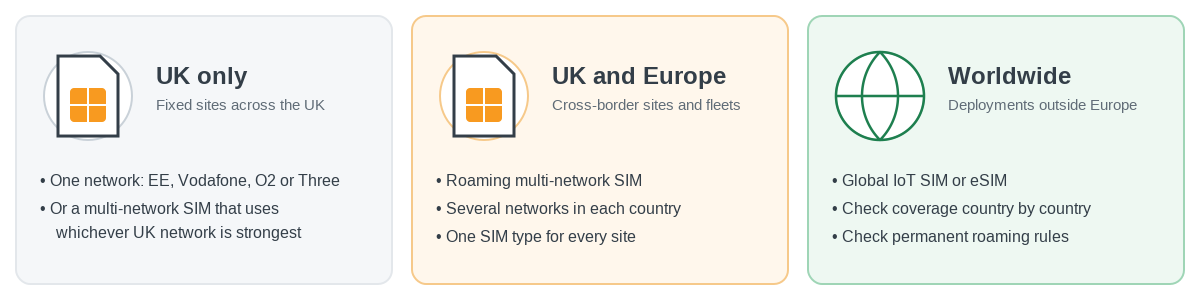
UK only
For fixed sites in the UK, choose a single-network SIM on EE, Vodafone, O2 or Three when you know which network is strongest at the site. Run a signal check first, or ask us to.
If the signal varies between sites, or you want one SIM type everywhere, a multi-network roaming SIM picks the strongest available UK network automatically.
UK and Europe
Our UK and EU roaming fixed IP SIMs work in the UK and across Europe, using multiple tier-one networks in each country. They suit fleets, temporary sites and organisations with sites in several countries.
The fixed IP stays the same whichever network or country the SIM connects in, so remote access keeps working.
Countries covered
Austria, Belgium, Bulgaria, Croatia, Cyprus, Czech Republic, Denmark, Estonia, Finland, France, Germany, Greece, Hungary, Iceland, Ireland, Italy, Latvia, Liechtenstein, Lithuania, Luxembourg, Malta, Netherlands, Norway, Poland, Portugal, Romania, Slovakia, Slovenia, Spain, Sweden, Switzerland, United Kingdom.
Worldwide
Outside Europe, coverage, prices and rules vary country by country. Some countries do not allow a foreign SIM to roam permanently, so a SIM that works on a visit may be blocked if it stays.
Tell us the countries and how long the devices will be there, and we will advise on the right option before you commit.
Single-network or multi-network SIM?
A single-network SIM stays on one operator. It is simple and good value when that network is strong at the site, but if the network has a local outage or a weak signal, the device has nowhere else to go.
A multi-network SIM can use more than one network. Paired with an industrial router, it connects to the strongest available network and moves to another if the first one drops. That gives you built-in resilience and lets you use one SIM type across every site.
Steered or unsteered?
Many multi-network SIMs are steered: they prefer one network and only move when it fails completely. Our unsteered multi-network SIMs choose the best available signal, so a site with a weak preferred network still gets the strongest connection. Data use is pooled across your fleet for simpler management.
For maximum resilience, use a dual-SIM router with SIMs on two different networks.

| Single-network SIM | Multi-network roaming SIM | |
|---|---|---|
| Networks | One: EE, Vodafone, O2 or Three | All UK networks plus multiple networks per European country |
| If the network fails | Device is offline until it returns (unless the router has a second SIM) | Router reconnects on another network |
| Best for | Fixed UK sites with one clearly strong network | Mixed or unknown signal, vehicles, temporary sites, Europe |
| Fixed IP options | Public or private | Public or private |
Dynamic IP, fixed public IP or fixed private IP with VPN?
This is the choice that matters most. It decides whether you can reach your router and the devices behind it from elsewhere, and how exposed they are to the internet.

Dynamic IP
Standard mobile data. The network shares one public address between many users (carrier-grade NAT, or CGNAT), so your router can reach the internet but nothing can connect in to it.
Use it when devices only send data out, or you manage them through a cloud platform such as Teltonika RMS.
Fixed public IP
Your router gets its own internet address that never changes. You can connect to it, and forward ports to devices behind it, from anywhere.
Use it when your software or customer needs to connect directly over the internet and cannot use a VPN. A firewall and strong passwords are essential.
Fixed private IP with VPN
Your router gets a fixed address on a private network. It cannot be reached from the internet at all. You connect through a VPN that we provide, then reach the router and its devices as if they were on your own network.
Use it when security matters: CCTV, SCADA, utilities, payment terminals and critical sites.
| Dynamic IP | Fixed public IP | Fixed private IP + VPN | |
|---|---|---|---|
| Reach the router from elsewhere | No (only through a cloud service) | Yes, from any internet connection | Yes, through the VPN |
| Visible to the internet | No | Yes | No |
| Port forwarding to cameras or PLCs | No | Yes | Not needed: devices are reachable over the VPN |
| Security effort | Low | High: firewall, hardening, strong passwords | Low: access is controlled by the VPN |
| Typical uses | Telemetry, cloud-managed devices, site internet | Remote access where VPN is not possible | CCTV, SCADA, energy, security systems |
Can I use dynamic DNS instead? Not on mobile data. Because UK mobile networks use CGNAT, your router has no public address for dynamic DNS to point at. A fixed IP SIM, or a cloud remote-access service, is the reliable answer.
How much data do you need?
Allowances run from 1GB to 500GB a month, on contract terms from 1 to 36 months. As a rough guide:
1 to 2GB
Telemetry and alarms
Meters, sensors, alarm panels, payment terminals and occasional remote logins.
5 to 20GB
Remote access and light use
Regular router and PLC access, software updates, a camera viewed now and then.
50 to 200GB
CCTV and busy sites
Several cameras viewed daily, recordings pulled off site, small offices and cabins.
500GB
Site broadband
Continuous video upload, primary internet for an office, welfare unit or event.
These are estimates. Actual use depends on your devices and settings, so tell us what you are connecting and we will help size it.
CCTV data calculator
Live viewing data depends on the camera's bit rate. A compressed stream at a low frame rate is typically 100 to 350 kbit/s, and an HD stream can be several thousand. Check your camera's settings for the real figure.
About 0.2GB a day, or 5.4GB a month.
Worked example: 200 kbit/s for one hour is 200 × 3,600 = 720,000 kbit, which is 720 megabits, or about 90MB.
Keeping usage under control
SIMs can be set up with usage alerts and automatic bars to stop unexpected high use. If you need a lot of data with a fixed IP, our 500GB fixed IP tariff is the large-data option, matching the 500GB fair-usage level the old unlimited plans had.

Security with a fixed IP
With a fixed public IP, your router is reachable by anyone on the internet, and it will be scanned within minutes of going live. Before you connect:
- Change all default passwords and use strong, unique ones
- Close every port you do not need, and allow access only from known IP addresses where you can
- Keep router and camera firmware up to date
- Turn off remote web and SSH access you are not using
For the strongest protection, choose a fixed private IP with VPN. Devices are invisible to the internet, and only people connected to the VPN can reach them. See our guide to VPNs on cellular routers.
Router and SIM in one: Device as a Service
MFLEX Device as a Service combines a pre-configured 4G router and fixed IP SIM for one monthly charge. Take it out of the box, power it up and it connects, with remote management, port forwarding and security set up to your requirements. Available with a public or private IP (private IP needs a VPN connection to our MFLEX service).
Ordering and activation
1
Tell us your needs
Use the form below or call 0300 124 6181. We confirm the right SIM, IP type and allowance.
2
Sign and set up payment
Fixed IP SIMs are on contract, billed monthly by direct debit or annually in advance. Any usage charges are invoiced monthly.
3
SIMs arrive active
Usually 24 to 48 hours after the contract and payment are in place.
4
VPN set up (private IP)
If you need VPN access, allow a few extra days for setup and testing.
Want to test first?
Try a roaming SIM on your own router before committing. Trial SIMs use a dynamic IP.
Fixed IP SIM FAQs
What is a fixed IP SIM card?
A data SIM that is given the same IP address every time it connects, so you always know where to find your router. It can be a public address, reachable from the internet, or a private address, reachable through a VPN. Read more in what is a fixed IP SIM.
Will my SIM have a public IP address?
Yes, if you choose a fixed public IP SIM. Your router gets a static public address and can be reached from the internet. With a fixed private IP SIM, access is only through a VPN, which is the more secure option.
Can I use dynamic DNS instead of a fixed IP SIM?
No. UK mobile networks use carrier-grade NAT, so a standard SIM does not get a public IP address and dynamic DNS has nothing to point at. Old 3G services sometimes gave out public addresses, but this was never guaranteed.
Can I use fixed IP SIMs for a site-to-site VPN?
Yes, but the design matters. If you plan to link several sites, talk to us before ordering so we can advise on IP addressing, routing and security.
Which networks do your fixed IP SIMs use?
Single-network SIMs are available on EE, Vodafone, O2 and Three. Our roaming fixed IP SIMs work on all four UK networks and on multiple networks in each European country.
Can I limit data use to my allowance?
Yes. SIMs can be set up with usage alerts and automatic bars to stop unwanted high use.
How much data does an IP camera use?
It depends on the camera, codec, resolution and frame rate. A well-compressed, low-frame-rate stream is often 100 to 350 kbit/s, which is roughly 45 to 160MB per hour of viewing. HD streams use much more. Use the calculator above with your camera's real bit rate.
What are the payment options?
Contracted SIMs are normally billed monthly by direct debit. Annual billing is also available. Any usage charges in a month are invoiced separately.
How quickly will my SIMs be ready?
Usually 24 to 48 hours after the contract is signed and payment is set up, delivered active and ready to use. VPN access can add a few days for setup and testing.
Related guides
Get fixed IP SIM pricing
Tell us the network, data allowance, term and IP type you need and we will send current tariffs. Not sure? Pick your best guess and add a note. We will advise.